
Results
The results command family works on existing local AgentV run workspaces and index.jsonl manifests. Use it after an eval run to inspect failures, validate manifests, export artifact layouts, combine/delete local run workspaces, or generate a shareable HTML report.
Remote result repository exchange is intentionally not part of agentv results. New eval runs publish completed artifacts to a configured results repo or branch; sync.auto_push: true additionally pushes that branch to the remote. Manual remote status and sync are Dashboard/API workflows. See Dashboard Remote Results for configuration and sync behavior, and WIP checkpoints for recovering in-progress runs before final publish.
Subcommands
Section titled “Subcommands”| Subcommand | Purpose |
|---|---|
results report | Generate a self-contained static HTML report from an existing run workspace |
results export | Materialize or normalize the artifact workspace structure for a manifest |
results combine | Combine partial local run workspaces into a new local run workspace |
results delete | Delete one or more local run workspaces |
results summary | Print aggregate metrics for a run |
results failures | Show only failing cases |
results show | Display case-level rows from a run workspace |
results validate | Validate that a workspace or manifest resolves correctly |
results combine writes the new run under the source experiment when every selected source run belongs to the same experiment, including default. If the source runs span multiple experiments, pass --experiment <name> for the new combined run; AgentV does not silently write mixed-experiment combines under a combined namespace.
results report
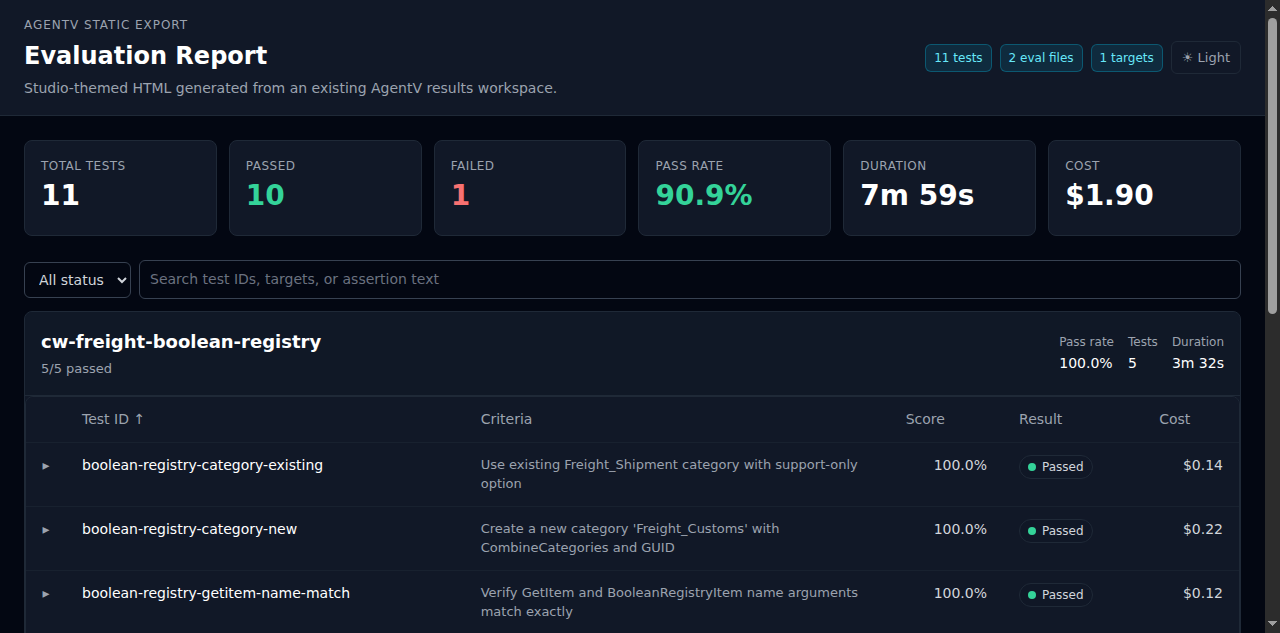
Section titled “results report”The results report command turns an existing run workspace or index.jsonl manifest into a self-contained HTML report for sharing, inspection, and human review.
agentv results report <run-workspace-or-index.jsonl>Examples:
# Generate report.html next to the run manifestagentv results report .agentv/results/default/2026-03-14T10-32-00_claude
# Use an explicit output pathagentv results report .agentv/results/default/2026-03-14T10-32-00_claude/index.jsonl \  --out ./reports/human-review.html
What it shows:
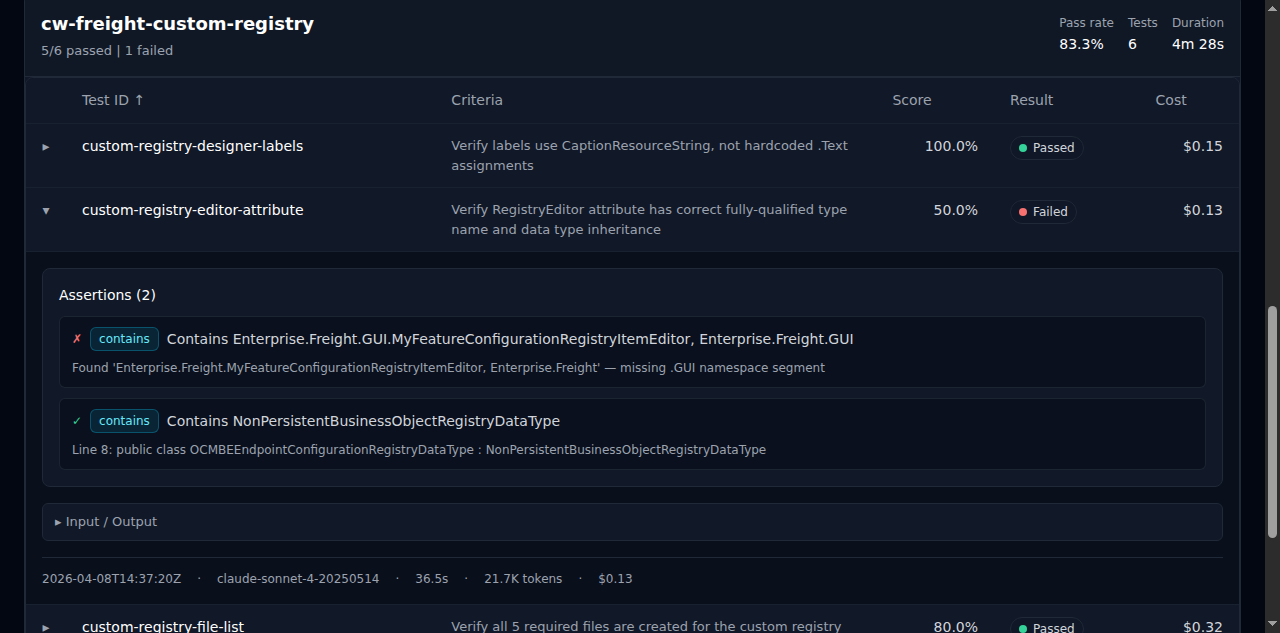
- Summary stats — total tests, passed, failed, pass rate, duration, and cost
- Eval file groups — test cases grouped by eval file with pass rate, test count, and duration
- Expandable details — unified assertions with pass/fail indicators and type badges, collapsible input/output
- Criteria column — shows the test prompt or description inline for quick scanning
Publish a static report with GitHub Pages
Section titled “Publish a static report with GitHub Pages”The generated file is self-contained HTML: no Dashboard server, API endpoint, or external asset host is required after it is written. That makes it a good fit for public result repositories served by GitHub Pages.
One minimal publication workflow is:
# 1. Run an eval and sync or copy the run workspace into your public results repo.agentv eval evals/demo.eval.yaml --output .agentv/results/demo-live
# 2. In the public results repo, render the report into the Pages source directory.agentv results report .agentv/results/demo-live --out docs/index.html
# 3. Review the generated HTML before publishing.grep -RInE 'sk-[A-Za-z0-9]|Bearer |localhost|127\.0\.0\.1|/home/|/Users/|/tmp/' docs/index.html
# 4. Commit the run artifacts and docs/index.html, then enable GitHub Pages#    for the repository's docs/ directory or the branch used for Pages.git add .agentv/results/demo-live docs/index.html README.mdgit commit -m "docs(results): publish static AgentV report"git push
Use --out docs/<name>.html when a repository should publish multiple runs. Link those files from the result repository README so readers can browse a dashboard-like report from GitHub Pages instead of running agentv dashboard or opening raw JSONL.
| Option | Description |
|---|---|
--out, -o | Output HTML file (defaults to <run-dir>/report.html) |
--dir, -d | Working directory used to resolve the source path |
results export
Section titled “results export”Use results export when you need the artifact workspace layout itself rather than a rendered report.
agentv results export <run-workspace-or-index.jsonl> [--out <dir>] [--duplicate-policy update]This is useful when a manifest needs to be materialized into a predictable artifact tree for other tooling, review, or archiving. The run workspace is also where generated task bundles live: index.jsonl rows may point to per-result task_dir, eval_path, targets_path, files_path, and graders_path entries. Keep those generated artifacts with the run when sharing or auditing results.
Each exported trace sidecar and index.jsonl row includes a stable projection_identity derived from AgentV-owned fields: run_id, suite or eval_path, test_id, target, source_target, attempt, variant, envelope_id, trace_id, root_span_id, and the projection format/version. Retrying the same completed run keeps the same projection ID even when you choose a different --out directory, because run_id comes from the source run directory or source manifest name rather than the export destination.
Duplicate policy is explicit:
| Policy | Behavior |
|---|---|
update | Default. Rewrites the local projection for the same identity. |
skip | Leaves the existing local projection in place and records export_metadata.duplicate_policy: skip. |
error | Fails before rewriting local projection files when the identity already exists. |
attempt defaults to 0, variant defaults to null, and source_target defaults to target when a run has no replay source. Replay and rerun sources can set source_target, attempt, or variant; those values are part of the identity, so different attempts, variants, or source targets produce distinct projection IDs.
Metrics sidecar
Section titled “Metrics sidecar”Each direct per-case artifact directory includes metrics.json
(schema_version: "agentv.metrics.v1"). This is an AgentV-owned
derived projection over trace.json, the result row, and
grading.json. It is the compact executor behavior summary for dashboards,
comparison exports, and metric-style graders; it is not canonical trace storage
and does not carry token/cost usage.
Repeat-enabled cases use aggregate summary.json with flattened snake_case
timing fields plus aggregate grading.json, then store attempt details under
run-N/. Each run-N/ contains a compact per-attempt manifest
result.json, transcript.json, transcript-raw.jsonl, and outputs/answer.md,
plus AgentV grading.json. The result.json file carries grading_path,
transcript/output paths, and embedded timing/o11y metrics; repeat attempts do
not write a separate metrics.json sidecar.
transcript.jsonl remains the ordered conversational/log compatibility
projection. Full trace detail stays in trace.json
(agentv.trace.v1). benchmark.json remains the run-level aggregate summary,
and index.jsonl carries the lightweight metrics_path plus
the trace/transcript artifact pointers used for detached payload publishing.
Duration, token, and cost usage remains in timing.json, including source
labels such as provider_reported, token_estimated, aggregate, or
unavailable.
The metrics section aligns with Claude Agent Skills metrics.json
while adding AgentV/Vercel-style detail:
| Field group | Purpose |
|---|---|
tool_calls, total_tool_calls, total_steps, errors_encountered, output_chars, transcript_chars, files_created | Agent Skills-compatible executor metrics |
tool_call_events, tool_call_counts, tool_category_counts, shell_commands, files_read, files_modified, web_fetches, errors, reasoning_blocks, thinking_blocks, total_turns | AgentV/Vercel-style behavior summary when source data includes it |
Vercel @vercel/agent-eval results.o11y maps into AgentV like this:
| Vercel field | AgentV field | Artifact location |
|---|---|---|
shellCommands | metrics.shell_commands | metrics.json |
filesRead | metrics.files_read | metrics.json |
filesModified | metrics.files_modified | metrics.json |
toolCalls | metrics.tool_call_events, metrics.tool_calls, and metrics.tool_call_counts | metrics.json; compact counts can also appear in benchmark.json.run_summary[*].tool_calls |
totalToolCalls | metrics.total_tool_calls | metrics.json |
webFetches | metrics.web_fetches | metrics.json |
totalTurns | metrics.total_turns | metrics.json; conversational rows remain in transcript.jsonl |
errors | metrics.errors | metrics.json |
thinkingBlocks | metrics.reasoning_blocks and thinking_blocks | metrics.json |
Agent Skills eval artifacts map into AgentV like this:
| Agent Skills pattern | AgentV field | Artifact location |
|---|---|---|
Authored evals/evals.json cases | AgentV eval cases and task bundle paths | Eval source plus optional task_dir, eval_path, targets_path, files_path, and graders_path in index.jsonl |
| Per-case answer | Generated target output artifact | outputs/answer.md |
| Per-case sidecars | Trace, transcript, metrics, and raw provider evidence | trace.json, transcript.jsonl, metrics.json, provider.log |
Per-case timing.json | Duration, token totals, cost, and usage source labels | timing.json |
Per-case grading.json | Assertions, graders, execution metrics, workspace changes | grading.json; summary fields can reference the same trace/result facts |
Iteration-level benchmark.json | Pass rate, time, tokens, tool calls, cost aggregates | Run-level benchmark.json |
| Transcript/log outlier analysis | Ordered transcript and canonical trace | transcript.jsonl for log compatibility; trace.json for full detail |
| Aggregate pass rate/time/tokens/delta | Run summaries and comparison tooling | benchmark.json, result comparisons, and projection bundles |
Vendor-neutral projection bundle
Section titled “Vendor-neutral projection bundle”Use the additive projection bundle path when an external adapter needs a backend-neutral handoff instead of AgentV’s full artifact tree:
agentv results export <run-workspace-or-index.jsonl> --projection-bundleThis writes projection_bundle.json next to the exported artifacts. The bundle
contains stable projection IDs, trace envelope metadata, OpenInference-shaped
span references, score provenance, artifact-relative paths, capture/redaction
summary, and conversion warnings. It does not call Phoenix, Opik, Braintrust,
Langfuse, Hugging Face, or any other live service.
Do not use results export as an AgentV-to-Phoenix path. Phoenix is read-only
external trace correlation only when safe external_trace metadata points at
spans emitted independently; AgentV does not project completed runs, traces,
transcripts, datasets, experiments, or indexes into Phoenix.
For adapter development and CI snapshots, use dry-run mode:
agentv results export <run-workspace-or-index.jsonl> --dry-run > projection_bundle.jsonDry-run prints deterministic JSON and does not write export artifacts. Vendor
adapters should consume either this JSON directly or the local
projection_bundle.json. Dry-run refs are marked
artifact_refs.status: "planned_export" because the export tree has not been
written. Bundles written with --projection-bundle are built from the emitted
export index.jsonl and use artifact_refs.status: "emitted".
Raw prompt text, final output, and tool arguments/results are excluded by
default, and raw-bearing artifact refs such as grading_path, input_path,
answer_path, transcript_path, and trace_path are omitted from
metadata-only bundles. To include raw payloads and raw-bearing refs in the
bundle, opt in explicitly:
agentv results export <run-workspace-or-index.jsonl> --dry-run --include-raw-contentKeep backend-specific anonymization in the adapter layer. For example, an Opik
adapter can read the metadata-only bundle by default, or require
--include-raw-content and then run Opik anonymizers before upload. AgentV does
not run a custom redaction engine in results export; it records the capture
policy so downstream processing is auditable.
Inspection helpers
Section titled “Inspection helpers”For lightweight terminal workflows:
agentv results summary .agentv/results/default/<timestamp>agentv results failures .agentv/results/default/<timestamp>agentv results show .agentv/results/default/<timestamp> --test-id my-caseagentv results validate .agentv/results/default/<timestamp>For a review-centric workflow built around these artifacts, see Human Review Checkpoint.
Remote results sync/status
Section titled “Remote results sync/status”The CLI contract is deliberately narrow: agentv results manages local result artifacts only. It does not expose results remote status or results remote sync subcommands.
Use these supported remote workflows instead:
- Automatic publishing: configure
projects[].resultsor top-levelresults; newagentv evalandagentv pipeline benchruns publish completed artifacts after the run completes. Userepo.remotewithrepo.path: .andrepo.branch: agentv/results/v1to store primary result records on a dedicated branch of the source repo without requiring a machine-local Git remote name. AgentV reservesagentv/results/v1for primary results andagentv/artifacts/v1for heavy artifact payloads. Whenindex.jsonlrows point trace or transcript payloads atagentv/artifacts/v1, automatic publishing stores those bytes on that artifact branch in the same remote and publishes pointer keys such asruns/<run-path>/<pointer.path>. The configured results branch remains the metadata/control plane (index.jsonl,benchmark.json, tags, and pointers) instead of duplicating canonical trace/transcript payload bodies. Local pre-publish run workspaces can still contain those files beside the manifest so local tools keep working. Mutable run tags are stored astags.jsonwith atag_revision; there is no tag event log in the normal results layout.results.repo.pathwithoutresults.repo.remotemeans an existing local Git checkout, distinct fromworkspace.repos[].repo, which is a portable repository identity. AgentV manages any local Git remote alias internally. Setsync.auto_push: trueto push after publish, orsync.require_push: truein CI to fail when that push fails. Non-fast-forward result branch pushes block by default withsync.push_conflict_policy: block;backup_and_force_pushis an explicit single-writer opt-in that first creates anagentv/backups/<timestamp>-<target_branch_slug>-<remote_short_sha>remote backup branch and then force-pushes with a lease. While an eval is still running, WIP checkpoints can keep partial run output durable onagentv/wip/...branches when auto-push is enabled. - Manual Dashboard sync: run
agentv dashboard, open the project, and use Sync Project. - Manual API sync: while Dashboard is running, call
GET /api/projects/:projectId/remote/statusorPOST /api/projects/:projectId/remote/syncfor project-scoped automation. Single-project sessions also exposeGET /api/remote/statusandPOST /api/remote/sync. - Git escape hatch: for advanced recovery, inspect or repair the configured
projects[].results.repo.pathclone withgitdirectly, then sync again.